.png)
Kaabo Scooter Shutting Down Mid-Ride – Troubleshooting GuideUpdated 3 months ago
Step-by-Step Solutions to Identify and Fix Unexpected Shutoffs
Step 1: Eco/Turbo Button Check
If your scooter shuts off when pressing the Eco or Turbo button, disconnect the button from the scooter. You can usually do this from behind the button on the handlebars.
Ride the scooter after disconnecting it to see if the issue is resolved.
If the issue persists, keep this scenario in mind but continue troubleshooting other areas.
Step 2: Inspect Main Connectors
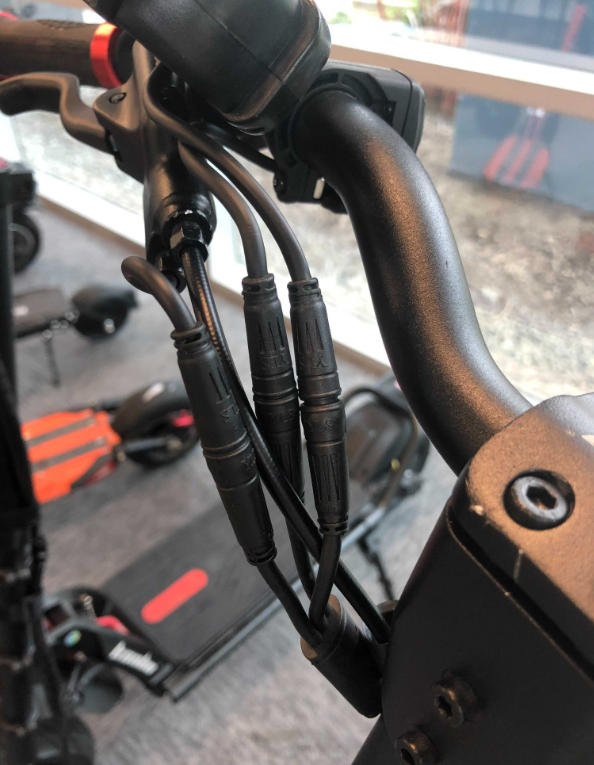
Check the main connectors (the exterior wires connected to plug-and-play accessories on the handlebars) for damage or cuts.
If damaged:
Direct the customer to purchase the replacement accessory if needed.
Depending on the situation, a replacement part or scooter repair may be required.
Here’s an example of what main connectors look like for reference:
Step 3: Check Back Fender Wires
Inspect the wires under the rear fender for any visible damage.
If damaged, send clear pictures to #technical in Slack to determine the necessary replacements.
A repair or part replacement may be required.
Step 4: LCD Display Issues
Unexpected shutoffs are often caused by the LCD display malfunctioning.
Ask the customer if any error codes appear on the LCD. This helps pinpoint the issue.
If the LCD is the cause, it will likely need replacement. Before proceeding, verify that the previous steps didn’t resolve the issue.
Replacement link: EY3 LCD Display
For scooters under 30 days old, create a paid order for the EY3 display if necessary.
Last Resort:
If none of the above solutions fix the problem, refer the issue to our technicians for further diagnosis and guidance.
Following these steps should help identify the cause of mid-ride shutoffs and get your Kaabo scooter back to proper operation.