.png)
Kaabo Display information and P-settingsUpdated 3 months ago
Keywords: Kaabo P-settings, Kaabo P settings
Kaabo P- settings
| P-Setting | What it Is | Wolf Warrior 11+ | Wolf King | Wolf Warrior X Pro | Mantis Pro SE |
| P0 | Wheel Size | 11" | 11" | 10" | 10" |
| P1 | Low Voltage Protection | 60 | 72 | 60 | 60 |
| P2 | Motor Magnetic Pole Setting | 15 | 15 | 15 | 15 |
P-Setting | What it Is | Recommended Setting | What 0 Does | What 1 Does | What 2 Does | What 3 Does | What 4 Does | What 5 Does |
| P3 | Speed Signal | 0 Can't alter | Speedometer Setting | N/A | N/A | N/A | N/A | N/A |
| P4 | Units (Miles or Kilometers) | 1 User Preference | Kilometers | Miles | N/A | N/A | N/A | N/A |
| P5 | Safety Settings (Start Mode) | 1 User Preference | Throttle Start (Scooter does not have to be moving for throttle to work) | Kick Start (Scooter has to be moving before throttle can work) | N/A | N/A | N/A | N/A |
| P6 | Cruise Control | 1 User Preference | Off | On | N/A | N/A | N/A | N/A |
| P7 | Acceleration Power | 3 Is Default User Preference | Fastest | Fast | Faster | Default | Slow | Very Slow |
| P8 | Max Speed by Percentage i.e. 50% = Top Speed cut in half | 100 User Preference or Based on Speed Limit | N/A | N/A | N/A | N/A | N/A | N/A |
| P9 | Energy Saving | 3 is Default User Preference | N/A | 50% | 75% | 100% No Battery Saving | N/A | N/A |
| PA | Electric Braking | 1 Is Default User Preference | No Electric Braking | Some Electric Braking | Some More Electric Braking | Even More Electric Braking | So Much Electric Braking | The Most Electric Braking |
| PB | Screen Brightness | 1-3 Recommended User Preference | Very Dark | Dim | Average | Bright | Brighter | Very Bright |
| PC | Time Till Auto Shutdown | 5 minutes User Preference | Not Set | 1 Minute | 2 Minutes | 3 Minutes | 4 Minutes | 5 Minutes --------> Up to 30 Minutes |
| PD | ABS Anti-Lock Brake System | 0 User Preference | Off | On | N/A | N/A | N/A | N/A |
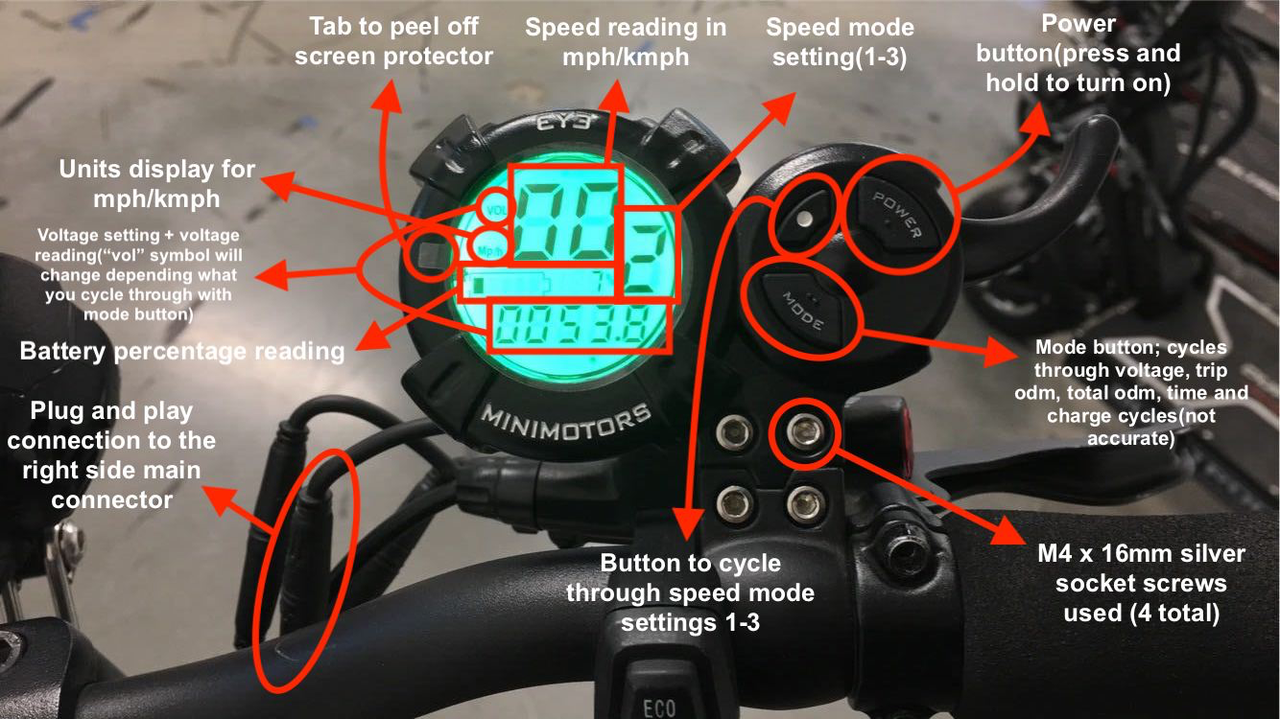
Here is an image of the EY3 display for reference. The plug and play wire comes out of the backside of the LCD which goes to the main connector connection highlighted in the bottom left corner.