.png)
Kaabo Brakes: Replacement & Troubleshooting GuideUpdated 3 months ago
Replacing Brake Levers / Brake Line to Assembly Set
Video Tutorial: Not available
Steps to Replace Brake Levers:
Remove the existing brake lever
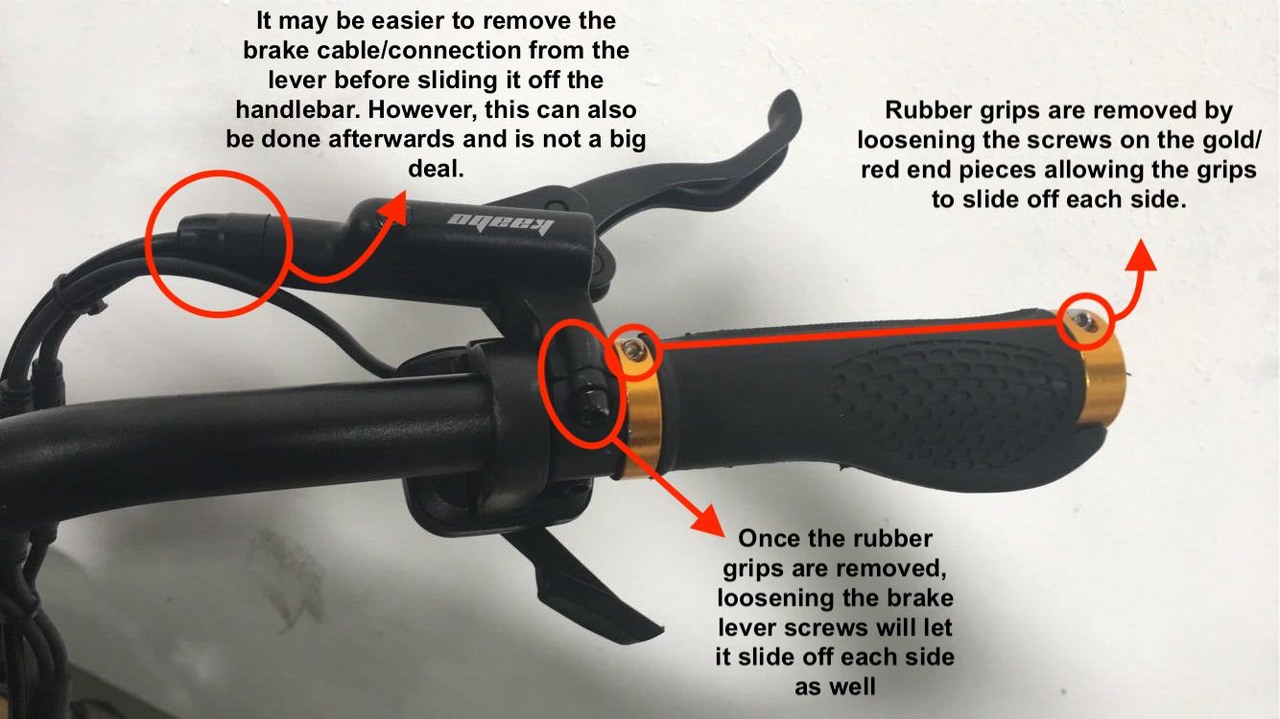
Remove the plastic cover over the brake line screw (pliers may help).
Unscrew the brake line screw and disconnect the brake lever. The lever is now free from the handlebar.
Prepare the new brake lever
Remove the brake lever plug screw to make room for the brake line screw.
Ensure you have the brake line plastic casing, brake olive, and brake line-to-lever screw (can reuse from old lever or purchase separately).
Install the new lever
Attach the brake line to the new lever and secure it on the handlebars.
Reconnect the pin connection to the main connectors.
Test the brake lever to ensure proper response.
Check that the brake sensor "!" displays correctly.
If brake fluid has spilled or been lost, refill/bleed as necessary (see below).
Replacing Brake Calipers / Brake Line
Video Tutorial: Kaabo Brake Caliper Replacement
Video is based on Mantis Pro SE and Wolf Warrior 11, but applies to other models. Note: Calipers may differ by model.
Replacing Brake Pads
Video Tutorial: Kaabo Brake Pad Replacement
Replacing Rotors
Video Tutorial: Rotor Replacement
Process is the same for front/rear and for 140mm/160mm rotors.
Requires removal of the motor/wheel:
Remove motor caps to access motor nuts.
Remove motor nuts and hook spacers.
Free the motor axle from the swingarm/fork.
Remove rotor screws (6 total) and replace rotor.
Reinstall rotor and motor/wheel.
Important: Do not use WD-40 on rotors.
Refilling Brake Fluid
Video Tutorial: Kaabo Brake Fluid Refill
General Brake Troubleshooting
Common Issues & Solutions:
Brake levers not responding / pads not contacting rotor
Check brake fluid. Refill/bleed if needed.
Inspect brake pads for wear; replace if necessary.
Squeaky brakes / pads not catching rotor / rubbing noises
Adjust caliper screws to loosen/tighten caliper.
Use a brake lever or Velcro strap to engage lever while adjusting.
If needed, add caliper spacers (1–3 per side).
Video Tutorial for Adjustment: Brake Adjustment Guide
Brake lever causes lights to flicker (Wolf King / Warrior GT)
Usually caused by a faulty step-down converter. Replace the step-down; replacing the headlight does not fix this.
Brake lever disengaging
Scenario 1: Brake lever fault → cracking noise when pulled indicates lever replacement.
Scenario 2: Caliper fault → replace calipers or send scooter in for repair.
Skidding / burning rubber / jerky brakes at high speed
Check if ABS is turned off. Turn ABS on in advanced settings to smooth braking.
If problem persists, escalate to technical support.
Brakes locking up
Adjust PD ABS setting: switch from 1 (on) to 0 (off).
If issue persists, contact the technical department.
This guide covers lever, caliper, pad, rotor replacements, fluid maintenance, and troubleshooting for Kaabo scooters. Follow the videos and step-by-step instructions carefully to ensure safe and effective brake performance.