.png)
Inmotion RS Motor Cable UpgradeUpdated 11 days ago
Overview
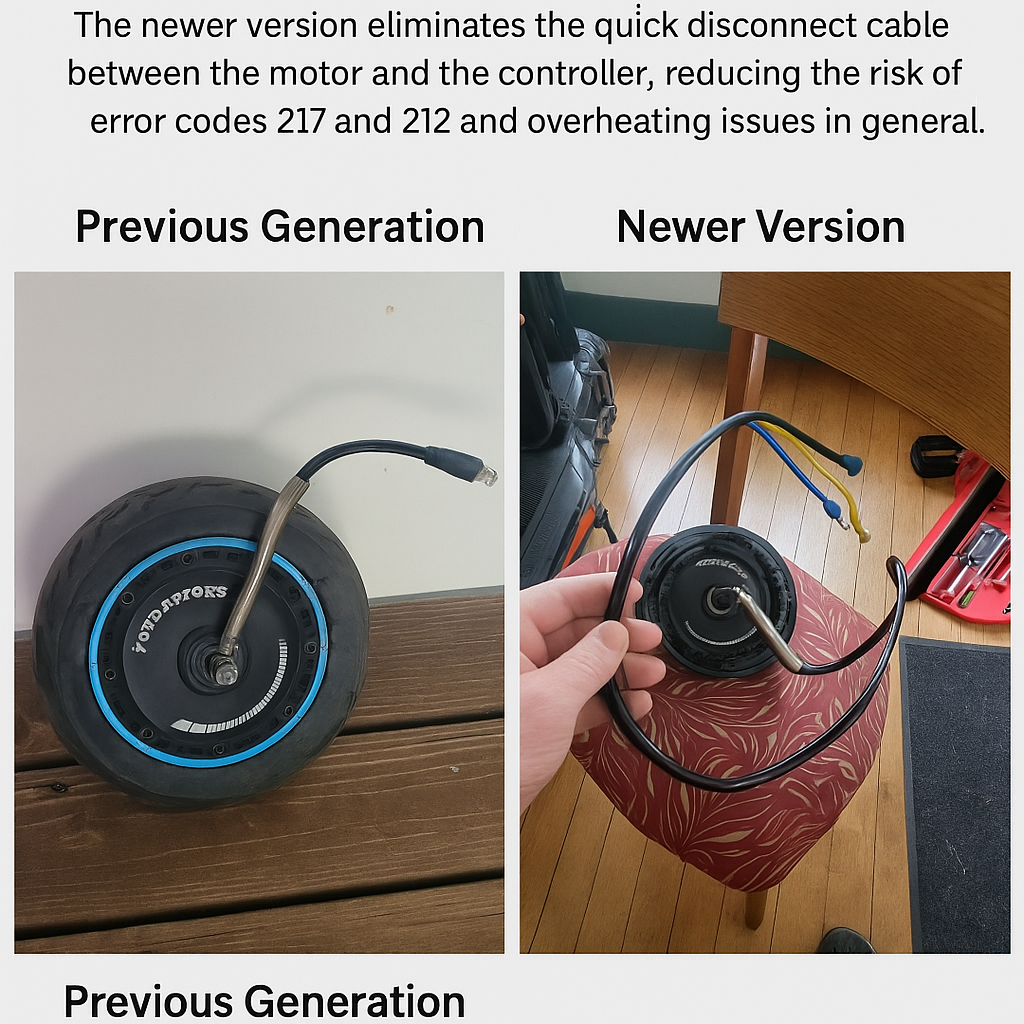
The Inmotion RS electric scooter has undergone a critical motor cable design upgrade to improve performance and long-term reliability. The key change lies in how the motor connects to the controller.What's New?
Old Version – Quick Disconnect Cable (Image: Left)Features a quick-disconnect plug between the motor and controller.
While convenient for swaps, this additional connector has been a common source of error codes 217 and 212, especially under heavy loads or sustained high output.
The extra junction can trap heat, increasing the risk of thermal issues in the motor cable during aggressive riding.
The new generation removes the intermediate connector entirely.
Now, the motor cable runs directly to the controller, resulting in:
Fewer failure points
Reduced risk of error codes (217, 212)
Improved thermal efficiency with better heat dissipation
Installation Guide for RS Owners
If you’re retrofitting the newer motor onto an original RS unit:Remove the bridge cable (quick-disconnect wire) entirely.
Connect the new motor cable directly to the controller ports.
Ensure all wires are routed cleanly and secured to avoid pinching or stress at the controller inlet.
Benefits of Upgrading
Eliminates connector failure points
Better motor performance under high loads
Enhanced durability over time
Fewer service errors related to heat and data signal interruption