.png)
How to Access and Adjust P-Settings for the Roadrunner V2 and V3Updated 3 months ago
The Roadrunner scooter comes with hidden P-Settings that control certain performance and display functions. Adjusting these can affect how your scooter behaves, so it’s important to follow the steps carefully.
Accessing the P-Settings
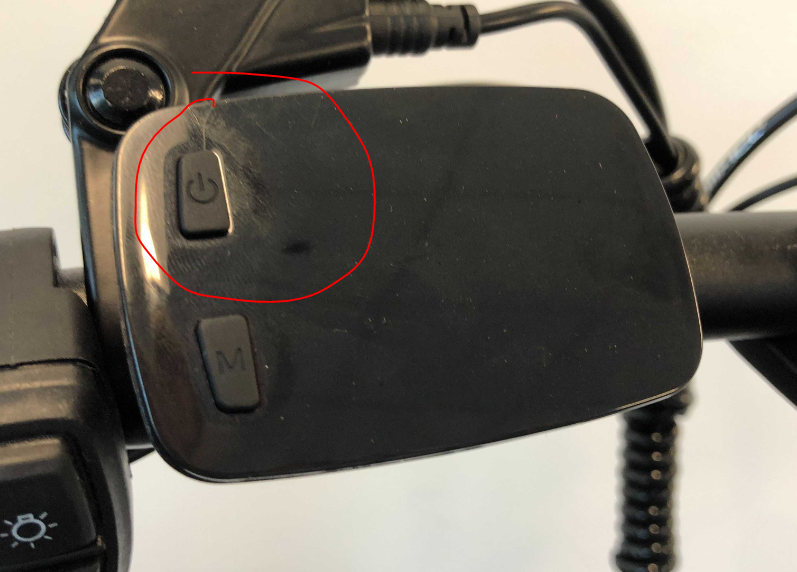
Step 1: Power on the scooter using the power button on the top left of the LCD.
.png)
Step 2: Enter the menu by holding both the power button and the M (Mode) button for 1–2 seconds.
.png)
You’ll now see the P-Settings screen, which looks like this:
Navigating the P-Settings
The menu includes P1, P2, P3 (and sometimes more depending on the model).
To move between settings, tap the power button while the “P number” (e.g., P1, P2) is flashing.
Changing a P-Setting Value
Once you’ve chosen a P-Setting, tap the Mode button to switch the flashing selection from the “P number” to the smaller number in the bottom-right corner.
To increase the value, tap the power button.
⚠️ There’s no direct way to decrease the number—you’ll need to keep cycling forward until it rolls back to the lowest value.
To save your changes, hold the power button until the P-number flashes again.
Exiting the P-Settings
Save and exit: Hold the power button again to return to the main menu.
Exit without saving: Hold the Mode button—your P-Settings will stay as they were when you entered.
⚠️ Important Note on Defaults
All default P-Settings are highly recommended. If you or a customer are experiencing performance issues and your P-Settings have been changed, resetting them to the defaults may resolve the problem.