.png)
EMOVE Cruiser Controller (Full Detailed Breakdown)Updated 3 months ago
Card Index(What this card covers):
General Information/Specs
Functionality(Details on wiring/relationships/iteration differences)
Troubleshooting (Anything that may involve controller); How to replace the controller
Water Damage
General Information
The controller serves as the "main brain" of the scooter and interacts with just about all electrical components. The controller has some ties to each part of the scooter in some way/shape/form. The Cruiser’s controller is involved with the following functions of the scooter:
Motor Function
Speed
Lighting
Braking
LCD Display/Voltmeter
Battery As of right now we currently have 4 iterations of the Cruiser controller. There are the following: - Pre September 2021 Cruiser Confseattroller - Post September 2021 Cruiser Controller(Just called "52V Controller with Motor Hall Cable (New 2021 EMOVE Cruiser)" - Long 2021 Cruiser Controller/ Summer 2022 Cruiser Controller(no official name for this, but now called "52V Controller with Motor Hall Cable (New 2021 EMOVE Cruiser)" - 52V Sinewave Controller for Emove Cruiser(Current controller being used) (See Images Below For Reference)
Pre September 2021 Controller Website Link: https://www.voromotors.com/products/52v-controller-for-52v-electric-scooters-previous-emove-cruiser?_pos=6&_sid=af65cae2b&_ss=r Should have the following connections:
Black/Red "Yellow Block" Battery Connection With Black/Red Connection Coming From It
Orange/White Connection
Yellow/Blue/Green Motor Connection
Black/White Connection
Black/Red Connection
Red/Orange/Black/Green/Blue/Yellow Connection
Single Grey Connection
Single Grey Connection
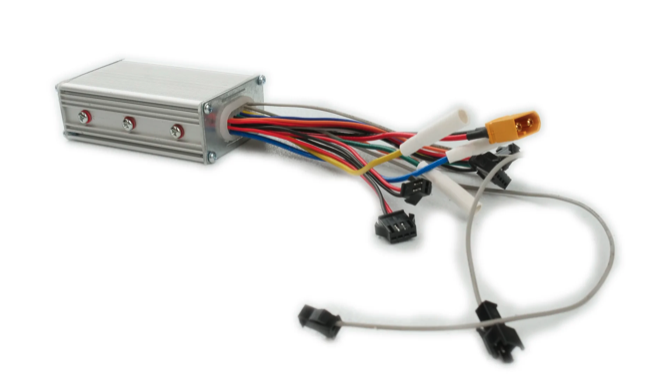
Post September 2021 Controllers(s) Website Link: https://www.voromotors.com/products/cruiser-controller?_pos=1&_sid=af65cae2b&_ss=r Should have the following connections:
Black/Red Battery Connection With Black/Red Connection Coming From It
Orange/White Connection
Yellow/Blue/Green Motor Connection
Black/White Connection
Black/Red Connection
Red/Orange/Black/Green/Blue/Yellow Connection
Single Grey Connection
Single Grey Connection
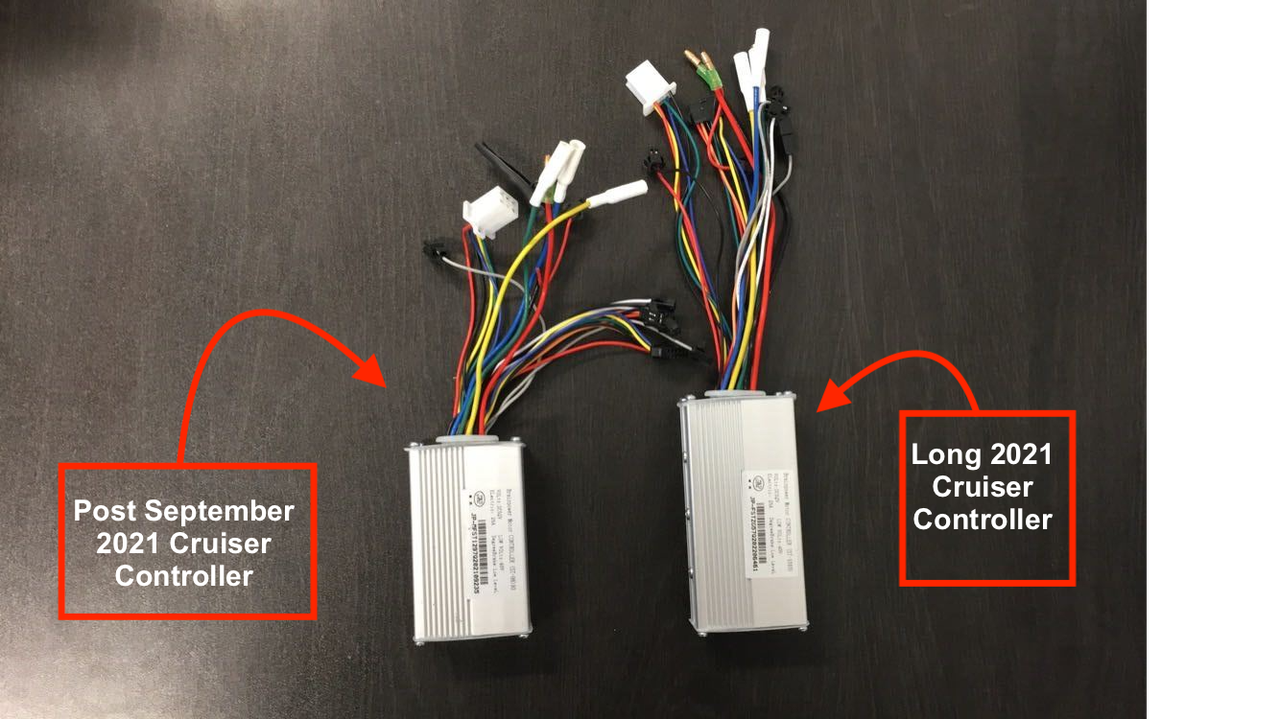
The above Cruiser controller is a 25A Square Wave, 52V BrainPower Motor Controller (ST-1010); Square wave with molex connectors. From YYK - Taizhou Quanshun Electric Drive Technology Co., Ltd.
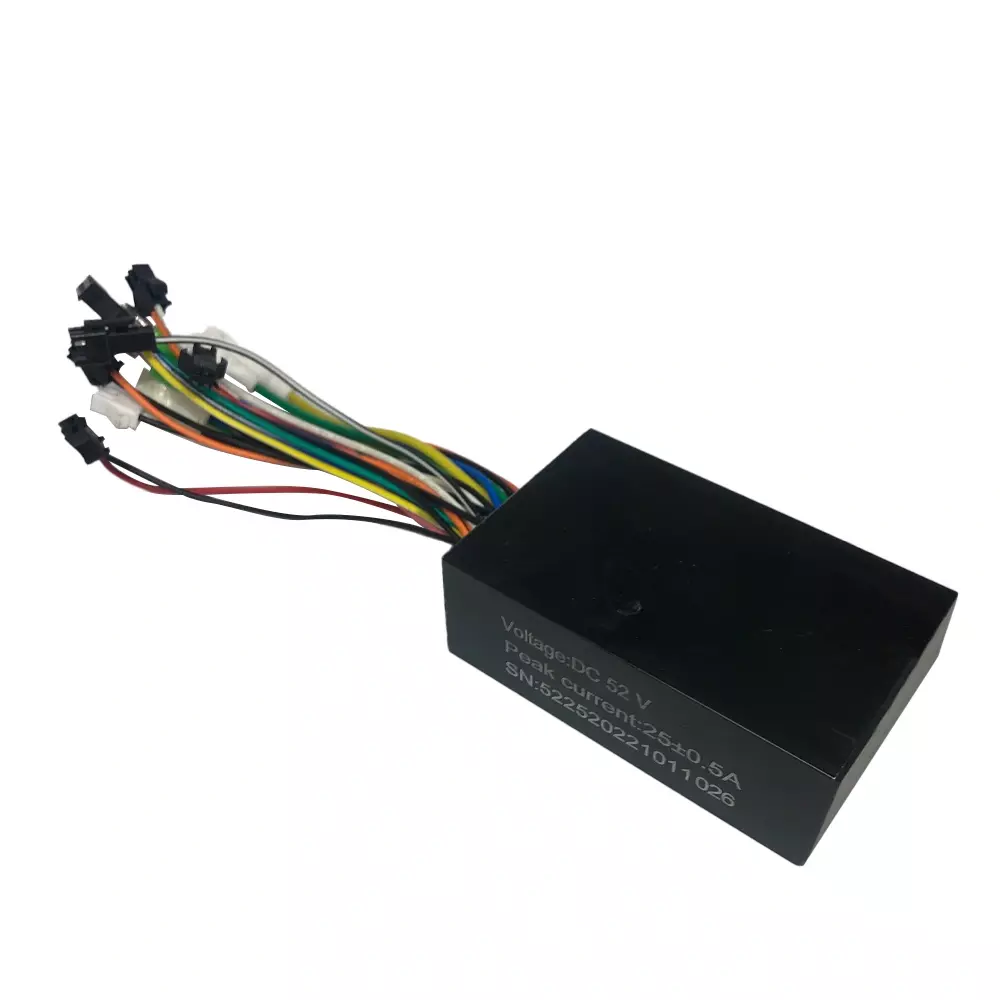
52V Sinewave Controller for Emove Cruiser Website Link: https://www.voromotors.com/products/52v-sinewave-controller-for-emove-cruiser?_pos=1&_sid=4142ec2d0&_ss=r Should have the following connecitons:
Black/Red Battery Connections
Motor Hall Connection
Yellow/Blue/Green Motor Wires
Reb/Black Connection
Orange/White Connection
Red/Orange/Black/Green/Blue/Yellow Connection
Single Black(male)
Single Black(female)
Black/Orange Connection
White tipped black/white connection
Functionality
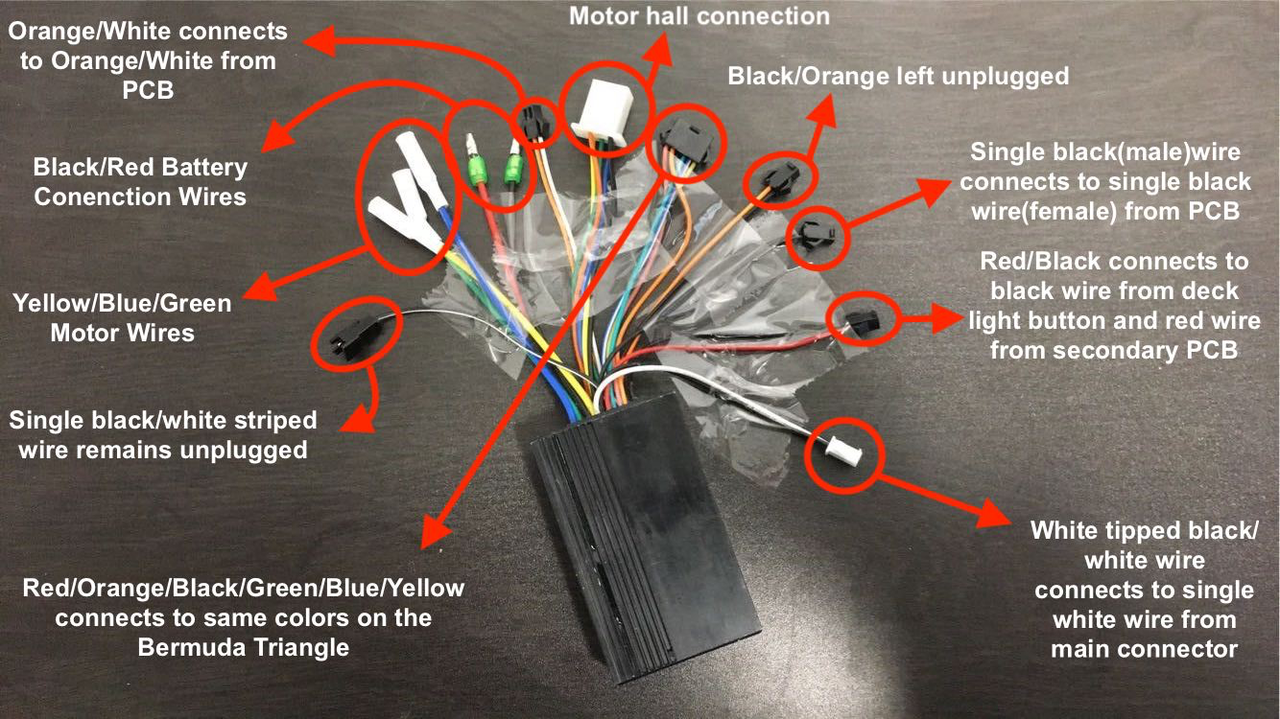
Here is the controller's wiring diagrams(Sinewave + previous squarewave version). You can see the function of each wire coming from it and what it connects to. *The black/red and orange/white wires which connects to a single black and orange/white wire from the PCB are responsible for lighting*
How to Install Sine Wave Controller:
Tutorial video: https://youtu.be/ Blog: https://www.voromotors.com/blogs/news/emove-cruiser-sine-wave-controller-replacement-tutorial Tools
How to Install a Sine Wave Controller on the EMOVE Cruiser
Tools Needed
3 mm hex key
4 mm hex key
A crate/stand to lift the scooter
1. Open the Deck
Elevate the scooter so it’s easier to work on.
Use the 4 mm hex key to remove the 5 large screws (3 in front, 2 in back).
Use the 3 mm hex key to remove the 10 smaller screws.
Lift off the deck cover to access the battery.
2. Open the U-Deck (Front Compartment)
Fold the stem down.
Remove 4 screws (4 mm hex) at the front of the U-deck.
Remove 2 screws (3 mm hex) on the sides.
Let the cover hang — don’t pull it off completely (wires are still attached).
3. Remove the Old Controller
Locate the controller (inside the deck or U-deck).
Unplug the following cables:
Phase wires: green, blue, yellow.
Motor hall cable (multi-wire port).
Orange/white, red/black, white/black wires.
6-pin connector (LCD + throttle).
Blue/black cable (PCB step-down).
Thick red & black wires (battery). ⚡ A small spark is normal.
Pull out the controller completely.
4. Install the New Controller
Place the new sine wave controller in the battery compartment with wires facing forward.
Feed the motor wires (phase + hall) out the left side of the U-deck.
5. Reconnect the Wires
Connect in this order:
Motor hall cable.
Green, blue, yellow phase wires.
White wire → white wire.
Orange/white wires + 6-pin connector.
Black (controller) → black (PCB).
Red/black (controller) → blue/black (LCD lights).
⚠️ Note: Black/white and orange/white wires are not used.
Black (controller) → blue (battery negative).
Red (controller) → red (battery positive). ⚡ Small spark is normal.
6. Test Before Closing
Power on the scooter.
Check: throttle, LCD, lights, and overall function.
If working correctly, tidy the wires in the U-deck.
7. Close Everything Up
Replace and tighten the U-deck cover (6 screws).
Replace the deck cover (10 small screws + 5 large screws).
Unfold the scooter — you’re done ✅.
EMOVE Cruiser – Troubleshooting Guide
If your EMOVE Cruiser isn’t working as expected, try the steps below before reaching out for support. Most issues can be solved with a few quick checks.
🔌 Scooter Won’t Turn On
Make sure the charger light turns red when plugged in and green when unplugged.
If it stays green while plugged in, the charger may be faulty.
Check that the battery is fully charged.
Inspect the power button and cables for any damage.
If the scooter still won’t power on, contact support.
🛑 Scooter Won’t Move When You Press the Throttle
Check the LCD screen:
If “PAS” shows, your scooter is in push-start mode. You’ll need to kick off to start moving.
You can switch to throttle start in the P-settings (P5).
Spin the rear wheel by hand:
If it feels very stiff or stuck → the motor may be damaged.
If it spins freely but the scooter still won’t move → the controller may need service.
Also check the wire near the rear fender to make sure it isn’t pinched or damaged.
⚡ Scooter Accelerates Briefly, Then Stops
Look for error codes on the LCD screen.
If none appear:
Spin the rear wheel by hand.
If it feels stiff → likely a motor issue.
If it feels normal → may be a controller issue.
A short in the fender wire can also cause this.
🔌 Unplugged Wires Inside the Deck
It’s normal to see three wires unplugged inside the Cruiser:
Two grey wires (speed limiter – should stay unplugged).
One red/black wire (extra headlight connector – not used).
If you see other unplugged wires, contact support for guidance.
💡 Scooter Shuts Off When Using Headlights
If the scooter powers off as soon as the lights are switched on:
Take a clear photo of your LCD screen.
Record a short video of the issue.
This usually points to a circuit board issue and may require repair.
⚡ Not Reaching Top Speed
The advertised 33 mph top speed is based on:
Rider weight: 150 lbs
Flat ground
Fully charged battery
Heavier riders or hills will lower top speed (e.g., 28 mph at 180–200 lbs is normal).
Quick checks if your speed feels too low:
Inflate both tires to 45 PSI.
Make sure the battery is fully charged.
Check P-settings: P1 = 43.0, P0 = 10 (or adjust to 9/11 if speedometer is inaccurate).
🔧 Damaged Pins or Connectors
If you notice bent or broken pins, the part may need to be replaced.
Sometimes pins can be re-pinned if you’re comfortable with light DIY repairs. If not, contact support.
⛰️ Hill Climbing Power Feels Weak
The Cruiser is rated for hills with a 150 lb rider.
Every extra 10 lbs reduces climbing ability by about 1° of slope.
Overloading on steep hills can cause the scooter to temporarily shut off. Let it cool down before trying again.
💧 Water Damage
Check for rust or corrosion on wires.
Even if the scooter runs now, corrosion can cause failures later.
If you see signs of water damage, the affected part (often the controller) may need replacement.
🛑 Limiting Top Speed (Optional)
If you’d like to set a lower maximum speed:
Use the P8 setting (default = 100%).
For the strictest limit, connect the two grey speed limiter wires inside the deck.
⚠️ Tip: If you ever feel unsure while troubleshooting, stop and contact our support team with clear photos or a short video of the issue. This makes it much faster for us to help you.